Opening Reciply
Your kitchen is almost ready.
Opening Reciply
Your kitchen is almost ready.
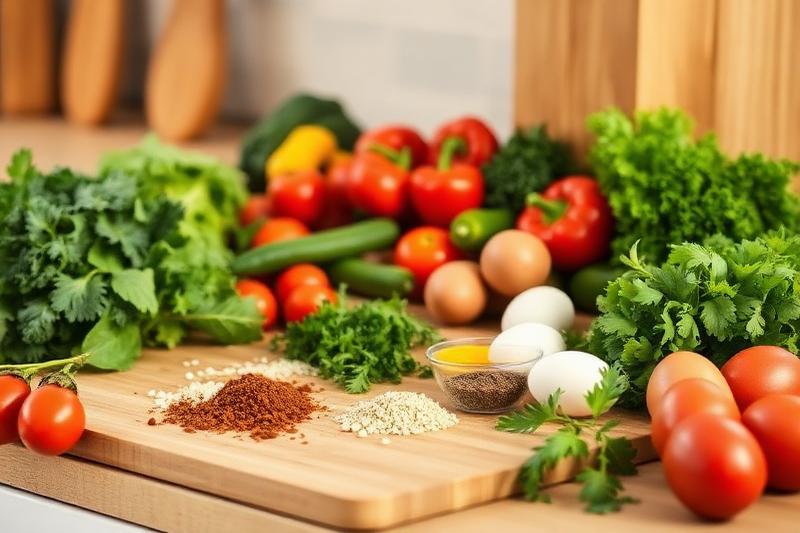
The Magic of Ingredient-Based Recipe Generation We've all been there: standing in front of an open refrigerator, staring at a random assortment of ingredients, wondering what on earth we can make for dinner. Maybe you've got half a bag of pasta, some wilting spinach, a block of feta cheese, and a couple of eggs. Individually, these items don't scream "dinner." But together? They're the foundation of a delicious Greek-inspired pasta frittata.
The problem isn't that you don't have enough food — it's that you can't see the recipe hiding inside your ingredient list. That's exactly the problem that AI-powered recipe tools like Reciply were built to solve. How "Enter Ingredients, Get a Recipe" Actually Works The concept is beautifully simple: you type in the ingredients you have available, and the AI generates a complete recipe using those specific items.
But behind the simplicity lies sophisticated technology. When you enter "chicken breast, broccoli, garlic, soy sauce, rice" into Reciply's SmartCook feature, the AI doesn't just search a database for recipes containing those keywords. Instead, it understands the flavor profiles of each ingredient, knows which cooking techniques work best for the combination, and generates a completely original recipe with proper proportions, cooking times, and nutritional information.
This means you'll never get a recipe that calls for 17 additional ingredients you don't have. The AI works within your constraints — using what you actually have in your kitchen right now. Why This Approach Reduces Food Waste According to the USDA, the average American household wastes approximately 30-40% of its food supply. Much of this waste comes from ingredients that were bought with good intentions but never used because the cook couldn't figure out how to incorporate them into a meal.
Ingredient-based recipe generation directly addresses this problem. Instead of planning meals around recipes (which requires buying specific ingredients), you plan meals around what you already have. That bunch of cilantro you bought for tacos three days ago? Enter it along with whatever else is in your fridge, and you'll get a recipe that uses it before it goes bad. Over the course of a month, this approach can significantly reduce both food waste and grocery bills — a win for your wallet and the environment.
Tips for Getting the Best Results While AI recipe generators are powerful, a few simple practices will help you get even better results: Be Specific About What You Have Instead of just entering "chicken," specify "chicken thighs" or "leftover rotisserie chicken." The more specific you are, the more tailored your recipe will be. Boneless chicken thighs call for different techniques than a whole rotisserie chicken.
Include Your Pantry Staples Don't forget to mention basics like olive oil, salt, pepper, garlic, onions, and common spices. These "background" ingredients give the AI more to work with and result in more flavorful recipes. Most home kitchens have these staples, so including them expands your options significantly. Mention Dietary Restrictions If you're cooking for someone with allergies or dietary preferences, include that context.
AI tools like Reciply can adjust recipes to be gluten-free, dairy-free, low-sodium, or accommodate other restrictions — but only if they know about them upfront. Don't Overthink It You don't need a perfect list of ingredients to get a great recipe. Even three or four items can yield surprising results. Some of the best meals come from creative constraints — having limited ingredients forces the AI to think creatively about flavor combinations.
Real Examples: What You Can Make Here are some real ingredient combinations and the types of meals Reciply can generate from them: Eggs, tortillas, cheese, salsa: Breakfast quesadillas with a crispy cheese crust Canned tuna, pasta, olive oil, capers: Mediterranean tuna pasta with lemon Sweet potatoes, black beans, cumin, lime: Smoky sweet potato and black bean bowls Ground beef, potatoes, onion, Worcestershire sauce: Classic cottage pie Bananas, oats, peanut butter, honey: No-bake energy bites or banana oat pancakes The beauty of AI recipe generation is that it sees possibilities where we see limitations.
What looks like "random fridge stuff" to you is a canvas of flavor combinations to the AI. Getting Started Is Free Reciply is free to start with 3 recipes and no commitment, and Reciply Plus gives you 20 new ingredient-based recipes every week. Simply sign up, head to the SmartCook feature, type in what you have, and let the AI do the creative work. Every recipe comes complete with step-by-step instructions, precise measurements, nutritional information, and a health grade — everything you need to turn your available ingredients into a satisfying meal.
What does Reciply cost? Reciply is free to use . Every account starts with 3 free recipes — no credit card needed — including Quick Cook, SmartCook, Fridge Scan, recipe photos, nutrition and A–F health grades. Saving, sharing and browsing community recipes stay free. If you cook often, Reciply Plus is an optional subscription for $1.99/week or $19.99/year . Both plans include 20 new recipes every week plus every kitchen tool.
You can cancel any time. See Reciply pricing for details. Use it on the web at reciply.us or download the free iOS app: Reciply — Recipe Generator on the App Store . Note: Reciply is an AI recipe generator that writes original recipes from the ingredients you have. It is not a recipe-saving, bookmarking, or cookbook-importing app, and it is not related to any similarly named recipe-organizing app.
Kitchen tools you can use in Reciply All of these are live in the app today. SmartCook — type in what is already in your fridge and get a recipe built around it. Free. Recipe Generator — pick meal type, cook time, difficulty and dietary goal. Free. Fridge Scan — photograph your fridge and get five meal ideas from what it sees. Free. Recipe Gallery — browse, rate and comment on community recipes.
Free. Recipe Remix — change one thing about a recipe and regenerate it, image included. Plus. Cook Mode — step-by-step cooking with built-in timers and a screen that stays awake. Plus. Meal Planner — build a multi-day plan around your calorie and dietary targets. Plus. Shopping Lists — turn any recipe or meal plan into a checkable list with duplicates merged. Plus. Diet Coach — log calories and macros and get told what to cook next.
Plus. Offline Recipes — download your cookbook so it works with no connection. Plus. Sources USDA FoodData Central — reference nutrient data used to sanity-check the calories and macros shown on Reciply recipes. FoodSafety.gov — Safe Minimum Internal Temperatures — the cooking temperatures referenced for meat, poultry, fish and eggs. Dietary Guidelines for Americans — the general nutrition guidance behind our A–F health grading.
USDA FSIS — Leftovers and Food Safety — storage and reheating guidance for leftovers. Nutrition figures and health grades on Reciply are estimates cross-checked against public databases, not lab measurements, and are not medical advice. See how Reciply works .
Home · Blog · What is Reciply
Try Reciply free and generate recipes from your ingredients. It is an AI recipe generator that writes original recipes from your ingredients — not a recipe-saving or cookbook-importing app. Free iOS app: Reciply on the App Store.